Sample No. 0205
iOS 27.2 Public Beta Adds a Preview of Apple’s Redesigned Health App
The iOS 27.2 beta lets testers preview Apple’s redesigned Health app, with new Insights and Longevity tabs ahead of its planned release later this year.
Apple’s iOS 27.2 public beta gives iPhone users an early look at a redesigned Health app, even though the app itself isn’t scheduled to launch with this software update. For people who track health information on an iPhone, the preview is the release’s main draw: it reorganizes the app around three tabs and adds a feature that compares health metrics with a person’s age.
Apple has made the beta available to people who want to try upcoming iOS features on their iPhone. The company’s release sequence is unusual. Rather than testing iOS 27.1 first, Apple is beta testing iOS 27.2 ahead of the first major iOS 27 update, which is due to arrive with the iPhone Duo in October. The source says Apple is keeping device-specific features under wraps, so testers shouldn’t expect the current beta to reveal much about that phone.
That leaves the Health app preview as the clearest reason to install this beta. Apple announced the redesigned app earlier in September and says it’s planned for release later this year. Testing it now gives users a chance to see the new organization before the finished version arrives. The beta version isn’t the final release, though, and its presence in iOS 27.2 doesn’t mean the full redesign ships as part of that update.
What changes in the Health app
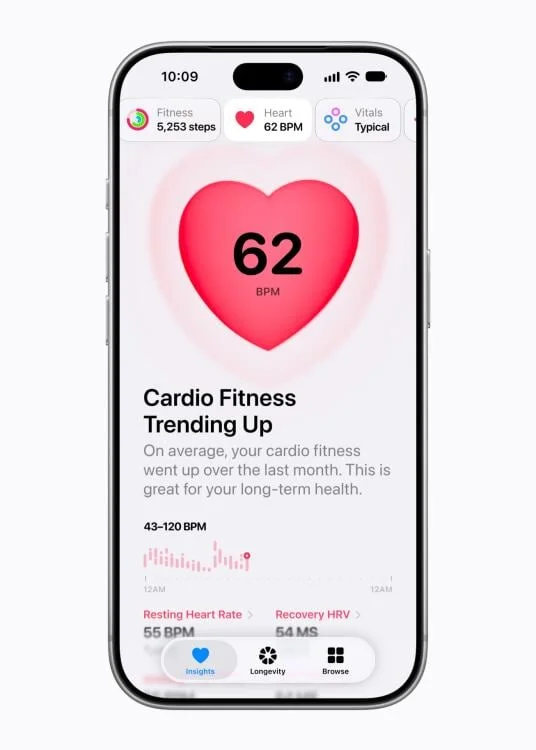
The redesign sorts Health into three tabs: Insights, Longevity and Browse. That structure separates broad summaries, longer-term views and ways to locate specific information. For people who already use the app, the practical question is whether the new layout makes the data they care about easier to find and interpret.
Insights is intended to bring a range of health metrics into one overview, with information updated throughout the day. The tab also includes a For You section that recommends articles. That makes it a starting point for checking a general picture of activity and health data, rather than requiring users to open several separate areas to assemble one.
Longevity takes a longer view. Its Health Age metric analyzes health information in relation to a person’s actual age, while the tab also tracks health over time and offers insights based on that history. Apple hasn’t provided details here about how the metric is calculated or which measures carry the most weight. Until those details are clearer, Health Age is best understood as one interpretation of the information a user tracks, rather than a complete assessment of health.
Browse is the third part of the redesign. It offers a way to find particular items that may not be immediately visible in Insights or Longevity. The division could make the app easier to navigate if the tabs clearly match what users are trying to do: check a summary, look for longer-term patterns or locate a specific category.
The useful test for an early preview is straightforward: see whether the new structure helps you reach familiar metrics, whether the summaries make sense, and whether the longer-term view adds context you’ll actually use. The beta can show how Apple is arranging these features, but the final app may still change before its planned launch.
How to install the public beta
Before installing beta software, save a recent backup of the iPhone to the cloud. A beta is unfinished software, so keeping a backup gives you a way to preserve a recent copy of your data if something goes wrong during testing.
Visit Apple’s beta software program page, sign in with your Apple account and register the device you want to use.
On that iPhone, open Settings, then General, then Software Update.
Select iOS 27.2 beta as the version to install, then wait for the download and installation to finish.
Installing the beta is a simple way to preview the Health changes, but the experience is still a work in progress. Anyone who depends on their phone every day should weigh the appeal of early access against the uncertainty that comes with testing unfinished software. People who prefer a finished experience can wait for the app’s planned release later this year.
Other changes to watch
The beta also includes individual profiles in the mobile Apple TV app, though the source offers few details about how those profiles work. The Health redesign remains the headline feature, and the iOS 27.2 beta does not appear to provide a meaningful preview of iPhone Duo-specific features.
Apple has put the Health app in front of testers before its planned release, giving the company time to refine the redesign. For users, the preview offers an early read on whether Insights, Longevity and Browse improve the day-to-day task of making sense of personal health information. The next useful details will be how Health Age works and what changes Apple makes before the finished app arrives.
If you have an iPhone, Apple might owe you money. Here’s how to claim it.


