Sample No. 0061
Google Messages Adds Circle to Search Scam Checks for Android
Circle to Search can assess suspicious Google Messages texts, explain warning signs and suggest next steps. Availability depends on Android phone support.

Google Messages users can now use Circle to Search to examine a suspicious text without copying it into another app. The feature sends the selected message for an AI Overview, which can explain why it may be fraudulent and suggest actions such as deleting it or blocking the sender. It’s a practical use of an existing Android tool, though its assessment should be treated as guidance rather than a definitive verdict.
Checking a message from the conversation
To try it, open Google Messages and find the text you want to assess. Press and hold the home button or navigation bar until Circle to Search starts, then circle the message on screen. Google’s AI Overview will analyze what it can see and present an assessment with supporting details.
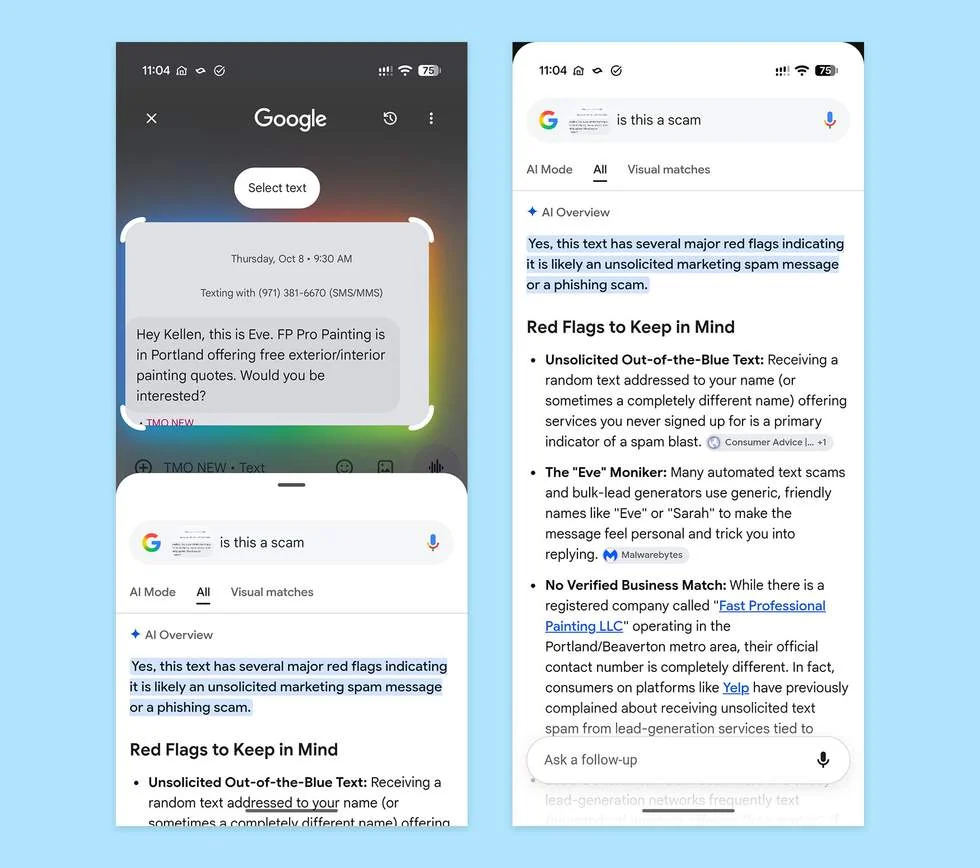
In the example described by the source, the selected text came from someone claiming to represent a painting company and offering to visit the recipient’s home to provide a quote. The tool identified it as a scam and pointed to several warning signs. The source doesn’t list those signs, so the useful point is the format of the result: an assessment accompanied by reasons, rather than a bare label.
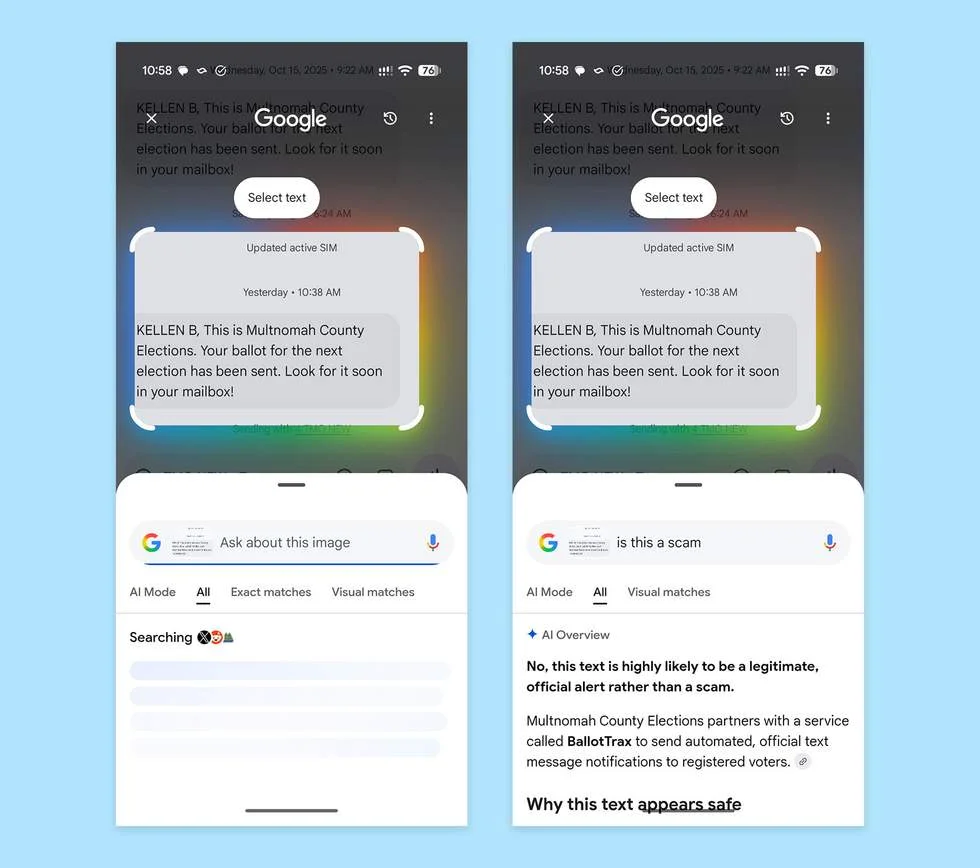
Circle to Search can also return a reassuring assessment. When tried on a different text, it described the message as highly likely to be a legitimate alert. That distinction matters for everyday use: unexpected messages can be suspicious without being fraudulent, and a tool that explains its reading may help people decide what deserves a closer look.
What the feature adds
The change is mainly about access and context. Circle to Search is already available on supported Android phones, and the new use case lets people invoke it while looking at a text in Google Messages. They don’t have to retype the message or switch to a separate scam-checking workflow. That lowers the effort involved in asking for a second opinion, especially when a message includes a request, an unexpected offer or other details that are hard to judge at a glance.
The explanation is potentially more useful than the classification alone. If the AI points to specific features of a message, a reader can compare those observations with the text they received and make a more informed choice. Suggested actions, such as deleting the message or blocking its sender, can also make the result easier to act on. The source doesn’t specify how the system reaches its assessment or what information it uses beyond the message shown on screen.
That gap sets a limit on how much confidence to place in the result. A text can look plausible and still be deceptive, while an unusual but legitimate message may raise warnings. The source reports both a scam assessment and a likely legitimate assessment, but it doesn’t provide accuracy data or explain how the system handles ambiguous cases. Users should read the reasoning and consider the surrounding context before acting.
Availability and practical limits
Google says the feature should be available now on Android phones that support Circle to Search. That means access depends on the device: installing or opening Google Messages alone won’t make the tool available on a phone without Circle to Search. The source doesn’t name specific models, describe a rollout schedule, or say whether any other settings are required.
For users with a compatible phone, the interaction is straightforward: select the visible text, review the AI’s explanation, then decide what to do. The feature appears to fit into the existing message-reading flow, so there’s no migration process described. Its day-to-day value will depend on whether the assessment is clear enough to help with uncertain messages and whether people understand that an AI judgment can be mistaken.
Google also shared details on the feature through its Circle to Search page. For now, the practical takeaway is simple: on a supported Android phone, a suspicious text in Google Messages can be checked in place, with an explanation and possible next steps. How reliably those explanations distinguish deceptive messages from legitimate ones remains the key question as people begin using the feature.


