Sample No. 0025
Blazor AI Components Bring Streaming Agents Into Application UI
Experimental Blazor components turn agent streams into typed UI blocks, shared state and reviewable actions, with .NET 11 RC1 and AG-UI.
Blazor’s experimental AI components address a practical problem in agent-enabled software: a conversation window alone doesn’t show what an agent is doing, what it has changed, or where a person needs to make a decision. The components turn streamed agent activity into observable content and state that a Blazor app can render as familiar interface elements.
That distinction matters when an agent calls tools, revises a document or builds a plan over several steps. Developers can show those operations as cards, editors, approval controls or progress views, while the application retains control over how data appears and which actions can proceed. The approach gives teams a way to combine natural language interaction with the precise controls users need to guide work.
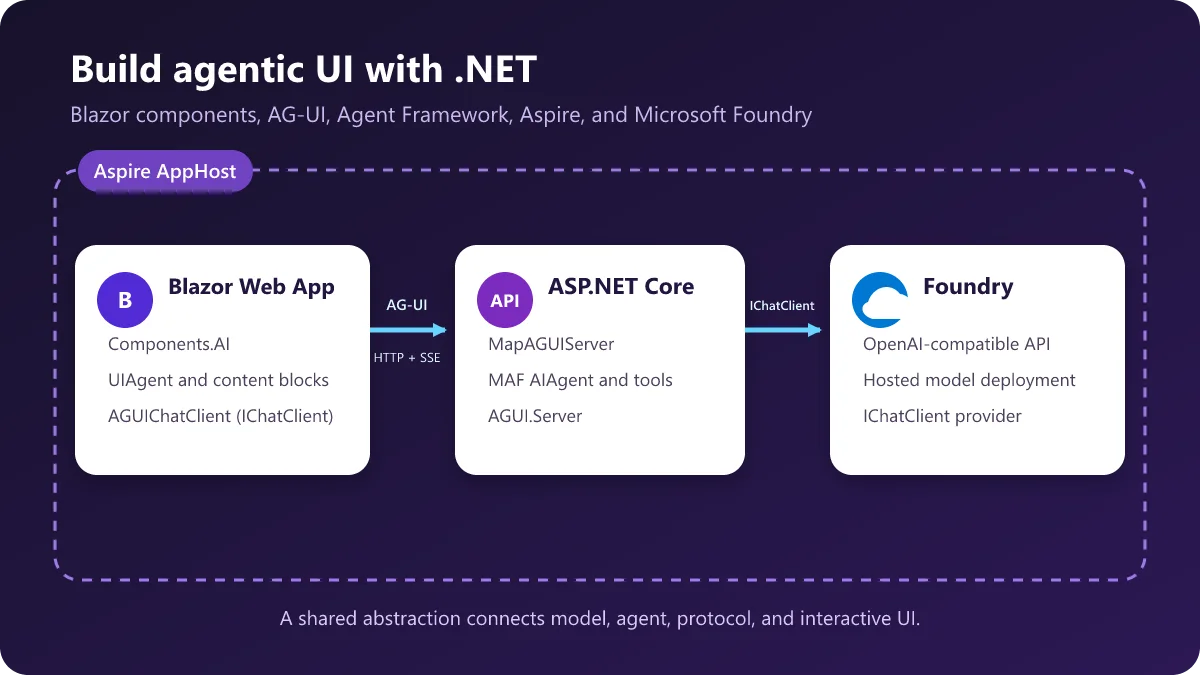
The components are experimental and available in the .NET 11 RC1 SDK. Microsoft’s AgenticUI sample assembles them with Microsoft.Extensions.AI, the AG-UI .NET SDK, Microsoft Agent Framework (MAF), ASP.NET Core, Microsoft Foundry and Aspire. It provides a runnable example of the architecture and the interaction patterns.
From a chat stream to UI building blocks
The package offers a high-level starting point and lower-level pieces for applications that need a different layout. Its main abstraction, UIAgent, wraps an IChatClient from Microsoft.Extensions.AI. It consumes streamed ChatResponseUpdate values and exposes their content as observable ContentBlock objects. Those blocks carry an identity, role, lifecycle status and change notifications, allowing components to update while a response is arriving.
ChatPage packages the common chat experience: a message list, text input, streaming status and retry behavior. After installing the .NET 11 RC1 SDK, a project can add the prerelease package:
dotnet add package Microsoft.AspNetCore.Components.AI --prereleaseA page can then use the component directly:
<ChatPage Agent="_agent" Placeholder="Ask me anything…" />The application creates the agent around a chat client:
IChatClient chatClient = GetChatClient();
_agent = new UIAgent(chatClient);
For more control, developers can compose AgentBoundary, MessageList, MessageInput and BlockRenderer<TBlock>. The boundary establishes the interaction context, the list displays turns, the input submits text, and a block renderer chooses Razor markup for a particular content type. The package includes blocks for conversational content, tool calls, approvals and frontend actions. Applications can add handlers for other model content.
The preview’s built-in input is text-focused. An application can supply its own input and call AgentContext.SendMessageAsync(ChatMessage) to submit images, files, audio or other Microsoft.Extensions.AI content. Capturing and transcribing media, along with any model-specific processing, remains part of the application and its AI services.
UIAgent<TState> extends the model with strongly typed application state that Razor components can observe and edit. A state mapper can apply updates arriving from the agent. This makes it possible for the user, agent and ordinary application components to work with the same application-owned data, rather than forcing every change into chat text.
Connecting Blazor to remote agents
Any IChatClient can provide the basic component experience. For agents exposed through AG-UI, the stable AG-UI .NET SDK adds AGUIChatClient, which implements IChatClient and translates protocol events into Microsoft.Extensions.AI response updates. That adapter also enables scenarios that use AG-UI features such as shared state and interrupts.
AG-UI is an open, event-based protocol for communication between agents and user-facing applications. It defines the events exchanged during an interaction; the application still decides which components render them. Blazor’s AI components draw on the same interaction model without depending directly on the protocol.
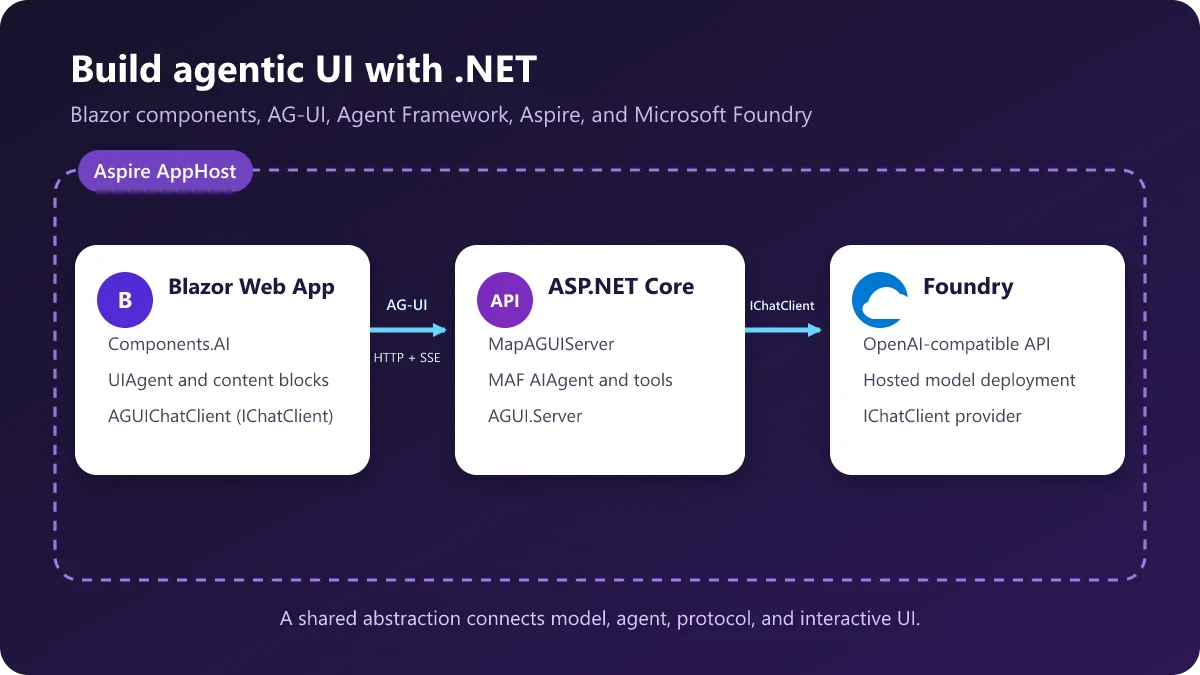
In the AgenticUI sample, a Blazor Web App communicates with an ASP.NET Core agent server. MAF builds agents over a model supplied by Microsoft Foundry, while ASP.NET Core exposes those agents as AG-UI endpoints. Aspire’s AppHost connects the projects, supplies Foundry configuration, coordinates startup and brings logs and traces into its dashboard.
The server registers the AG-UI hosting services and maps separate endpoints for the sample’s scenarios:
builder.Services.AddAGUIServer();
var app = builder.Build();
var foundry = Foundry.ReadOptions(app.Configuration);
var chatClient = Foundry.CreateChatClient(foundry);
var reasoningChatClient = Foundry.CreateReasoningChatClient(foundry);
var agents = new AgentCatalog(chatClient, reasoningChatClient);
app.MapAGUIServer("/agentic_chat", agents.CreateAgenticChat());
app.MapAGUIServer("/backend_tool_rendering", agents.CreateBackendToolRendering());
app.MapAGUIServer("/human_in_the_loop", agents.CreateHumanInTheLoop());
app.MapAGUIServer("/shared_state", agents.CreateSharedState());
app.MapAGUIServer("/predictive_state", agents.CreatePredictiveState());
AddAGUIServer and MapAGUIServer come from Microsoft.Agents.AI.Hosting.AGUI.AspNetCore. The MAF hosting layer uses AGUI.Server to translate MAF response streams into AG-UI events delivered over HTTP and Server-Sent Events. On the Blazor side, each endpoint gets an AGUIChatClient:
public IChatClient CreateChatClient(string endpoint)
{
    HttpClient http = httpClientFactory.CreateClient("agentserver");
    return new AGUIChatClient(new AGUIChatClientOptions(http, endpoint));
}
UIAgent wraps that client just as it would an in-process or provider-specific client. This keeps the UI-facing API consistent even when the agent runs remotely.
Rendering streams as structured content
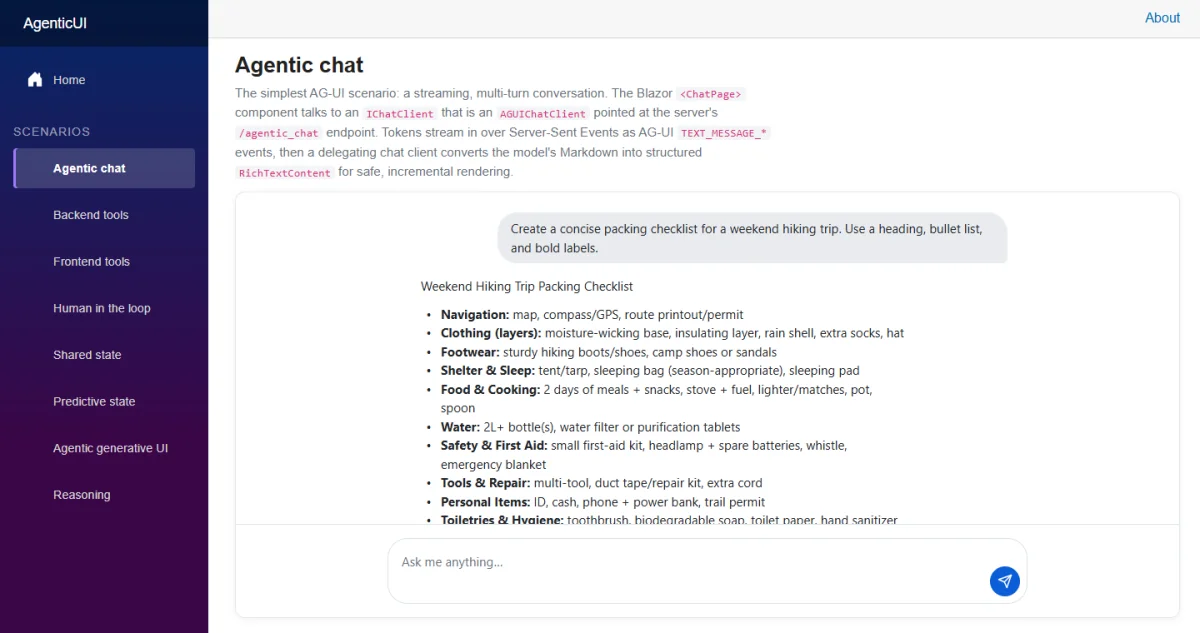
A streamed text response can become richer than a sequence of appended characters. In the sample, a DelegatingChatClient called FormattedChatClient accumulates Markdown by message ID and adds a structured snapshot to each update. The snapshot is parsed into presentation nodes, such as paragraphs, emphasis, inline code, lists, tables and images.
_chatClient = new FormattedChatClient(
    Agents.CreateChatClient("/agentic_chat"));
_agent = new UIAgent(_chatClient);
As text arrives, the client inserts the current structured representation:
var snapshot = text.ToString();
update.Contents.Insert(
    firstTextIndex,
    new RichTextContent(
        snapshot,
        MarkdownRichTextParser.Parse(snapshot)));
RichContentBlock renders RichTextContent. The package deliberately leaves the choice of Markdown parser to the application: teams can build the node tree themselves or use chat-client middleware to translate another format. That keeps formatting policy outside the component library.
Give tools an application-specific presentation
When a server-side agent invokes a tool, the resulting call and result can appear as a typed UI block. In the sample’s weather scenario, MAF executes get_weather on the server, and AG-UI streams its call and result to the browser. The [ToolBlock] source generator maps the arguments and result into a strongly typed block:
[ToolBlock("get_weather")]
public partial class WeatherToolBlock : FunctionInvocationContentBlock
{
    [ToolParameter(Name = "location")]
    public string? Location { get; set; }

    [ToolResult]
    public WeatherInfo? Weather { get; set; }
}
The agent registers generated mappings when it is created:
_agent = new UIAgent(
    _chatClient,
    options => options.AddGeneratedToolBlocks());
A BlockRenderer<TBlock> inside ChatPage.MessageListContent supplies the corresponding Razor UI. The renderer can display a pending state first and then the typed result in the same card:
<ChatPage Agent="_agent" Placeholder="Ask for the weather in a city…">
    <MessageListContent>
        <BlockRenderer TBlock="WeatherToolBlock">
            @{ var weather = context.Weather ?? new WeatherInfo(); }
            <div class="weather-card">
                <div class="weather-card__location">@context.Location</div>
                <div class="weather-card__temp">@weather.Temperature°C</div>
                @if (!context.HasResult)
                {
                    <div class="weather-card__pending">Fetching weather…</div>
                }
            </div>
        </BlockRenderer>
    </MessageListContent>
</ChatPage>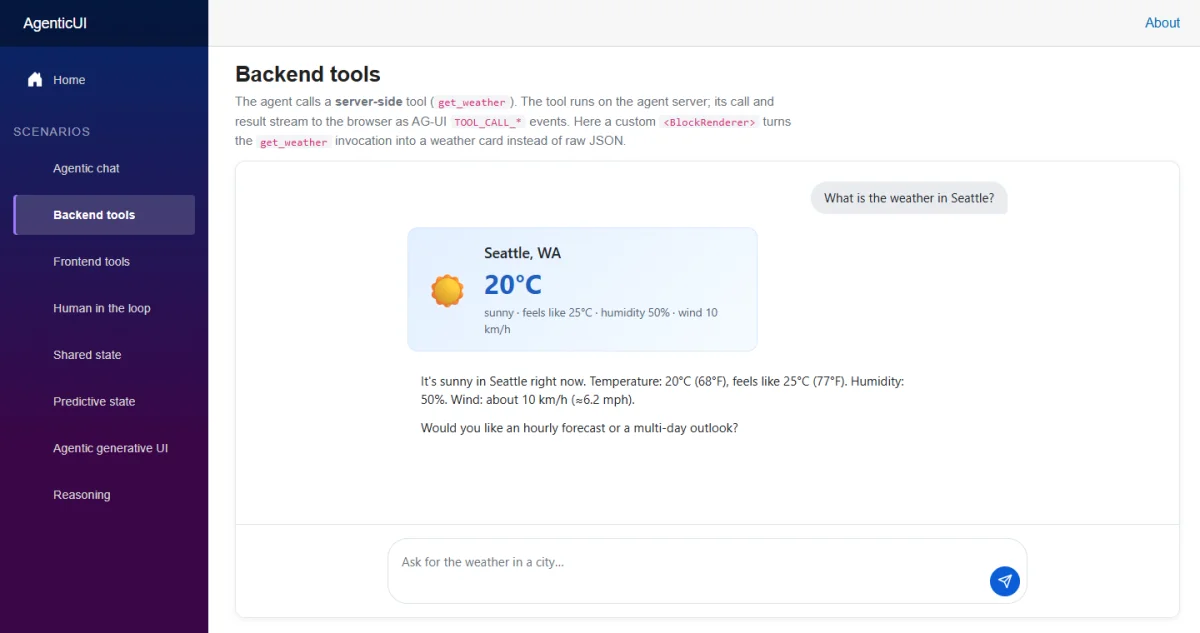
The tool still runs in the server pipeline. Blazor controls its presentation, so the card can use dependency injection, child components, CSS and localization like other application UI.
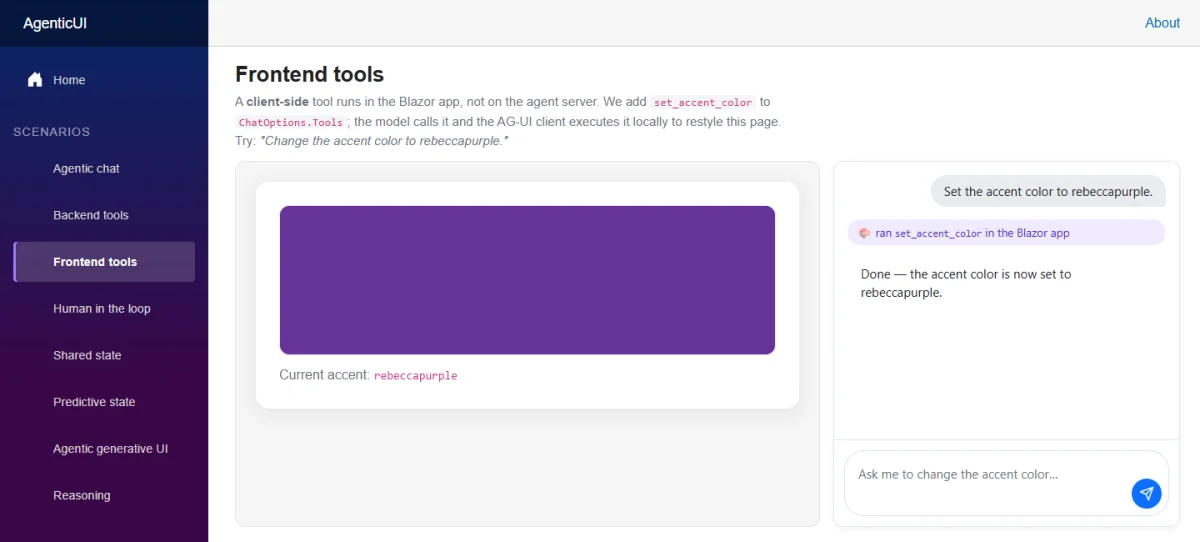
Frontend tools take a different route: they perform work owned by the user’s application, such as changing local UI state or opening a dialog. They use the same Microsoft.Extensions.AI tool model, but AGUIChatClient runs them in the client-side pipeline. In the sample, the remote agent can request set_accent_color, which updates a Blazor field and returns a result to the agent:
var setAccentColor = AIFunctionFactory.Create(
    async (string color) =>
    {
        await InvokeAsync(() => _accent = color);
        return $"Accent color set to {color}.";
    },
    name: "set_accent_color",
    description: "Set the accent color of the page.");
_agent = new UIAgent(_chatClient, options =>
{
    options.ChatOptions = new ChatOptions
    {
        Tools = [setAccentColor],
    };
    options.AddGeneratedToolBlocks();
});
The call can be rendered with another generated block. A renderer can show “Updating accent…” while the tool is pending and “Accent updated” after it returns. For actions that need a person’s input before the agent continues, RegisterUIAction creates a UIActionBlock that pauses until the application calls InvokeAsync().
Make consequential steps reviewable
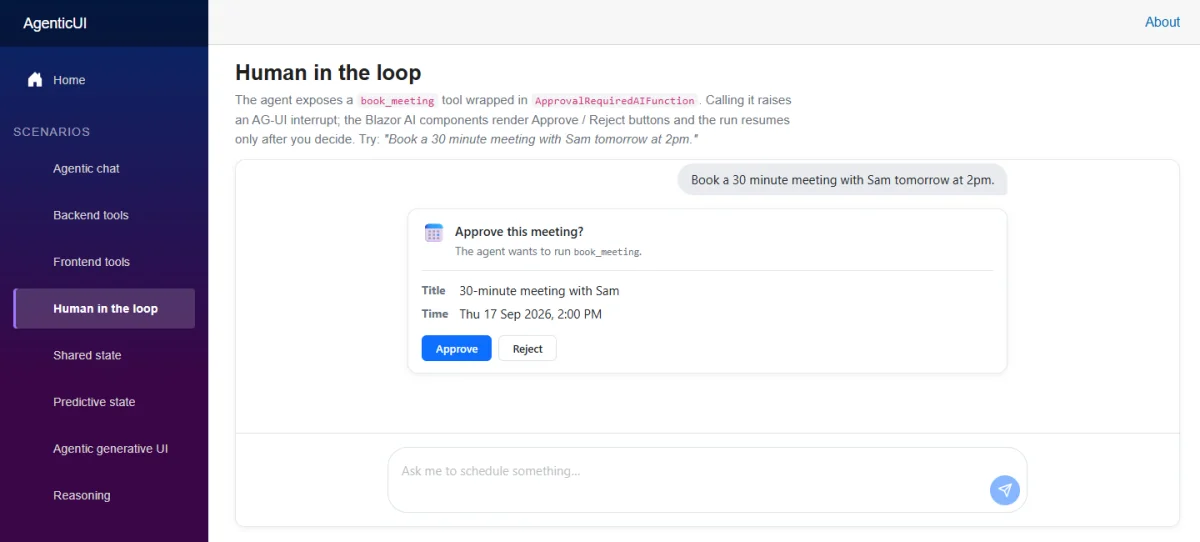
Tool execution and user approval are separate concerns. The sample wraps a server-side book_meeting function in ApprovalRequiredAIFunction. The resulting AG-UI interrupt becomes a FunctionApprovalBlock; a custom renderer presents the arguments and provides approval controls:
<BlockRenderer TBlock="FunctionApprovalBlock" Context="block">
    @if (block.Status == ApprovalStatus.Pending)
    {
        <button @onclick="block.Approve">Approve</button>
        <button @onclick="() => block.Reject()">Reject</button>
    }
</BlockRenderer>
Approving resumes the agent and lets the tool run. Rejecting returns the decision without executing it. The same interaction boundary can collect edits, missing fields or other structured input. An application can also let a user stop an active stream with AgentContext.CancelAsync. These controls put the application in charge of how a requested action is presented and when it may proceed.
Share state and review proposed changes
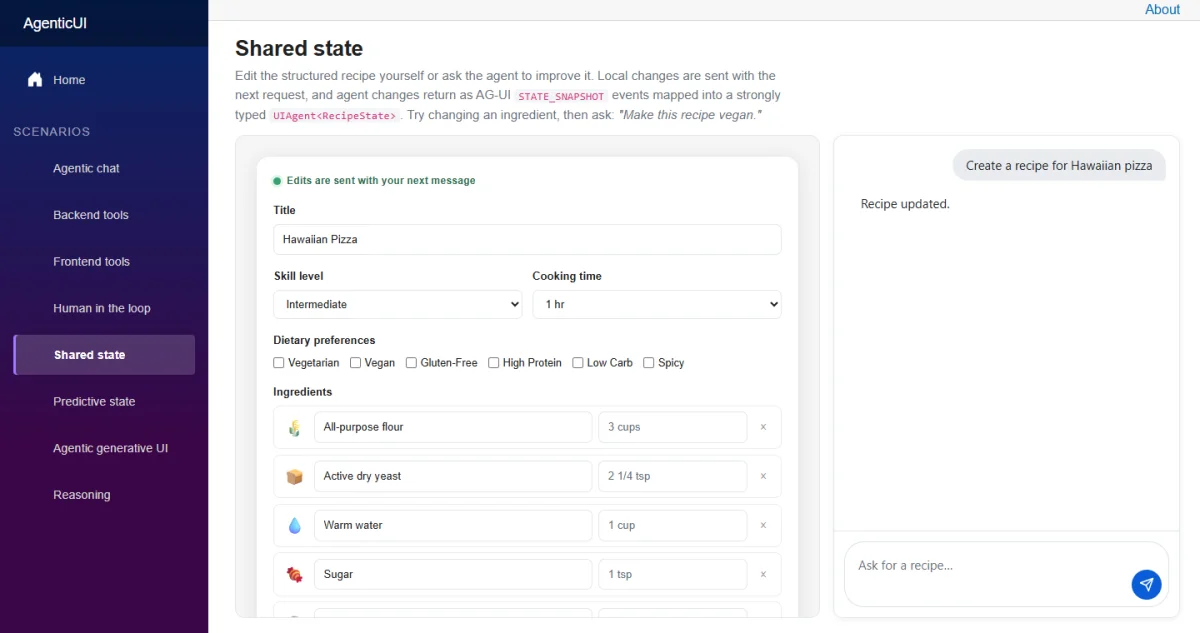
For some tasks, a message list is the wrong place to put the main work product. The sample’s shared-state page lets a person and an agent edit a recipe. The client sends the current typed state with the initial AG-UI request in RunAgentInput.State. On the server, the agent adds that recipe as context immediately before the latest user request. When the agent generates a replacement recipe, the endpoint maps the tool result to a STATE_SNAPSHOT.
The client’s state mapper deserializes that snapshot and calls SetState. The editor renders the resulting recipe as ordinary Razor, subscribing to state changes so incoming updates trigger a rerender. Direct edits replace State.Value; the next request therefore carries the user’s latest version. The result is a shared workspace where the agent can build on edits without making the message transcript the only interface.
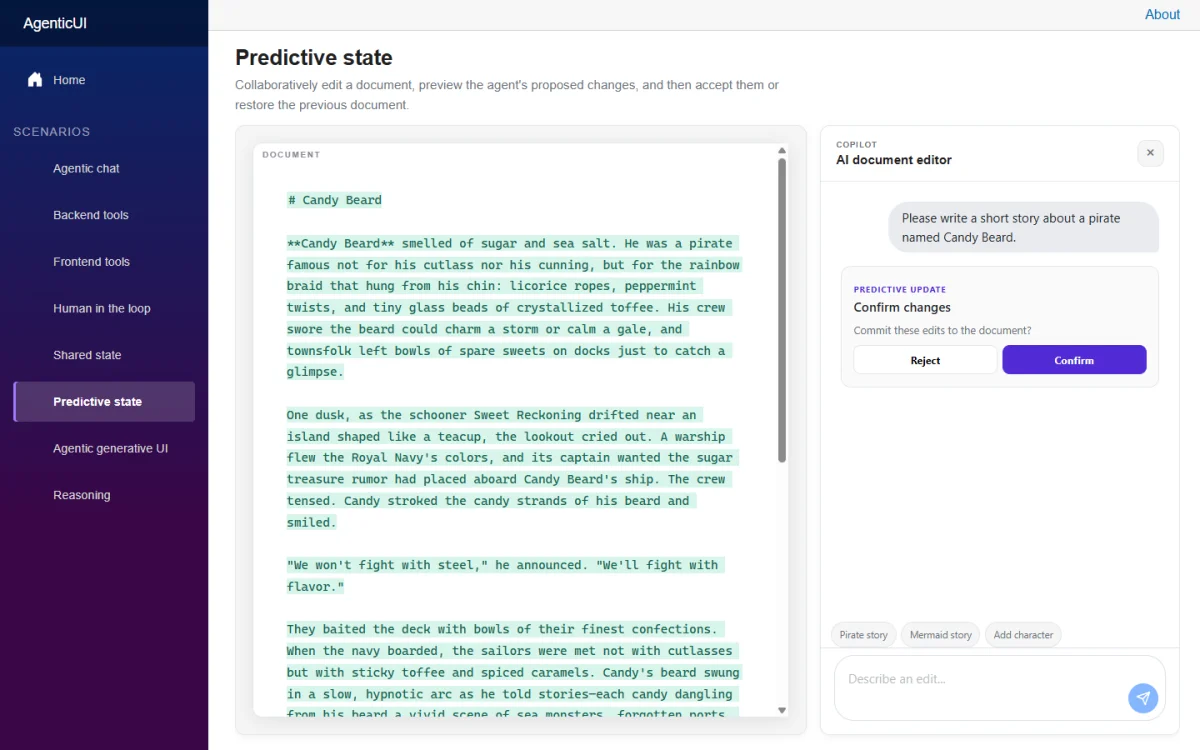
Predictive state adds a review step when an agent proposes a change that shouldn’t immediately replace the user’s current work. In the document editor, the agent’s propose_document action supplies a proposed version. A state mapper stores it as predictive state, and the UI displays the changes as a diff against the committed document.
A custom UIActionBlock renderer opens a confirmation component. The component adds the user’s choice to the action arguments and invokes it. Acceptance commits the proposed document; rejection restores the baseline. If a run fails, is canceled or ends without a decision, unresolved predictive state is rejected. This gives the agent room to draft while keeping the final document under user control.
Build views from changing agent state
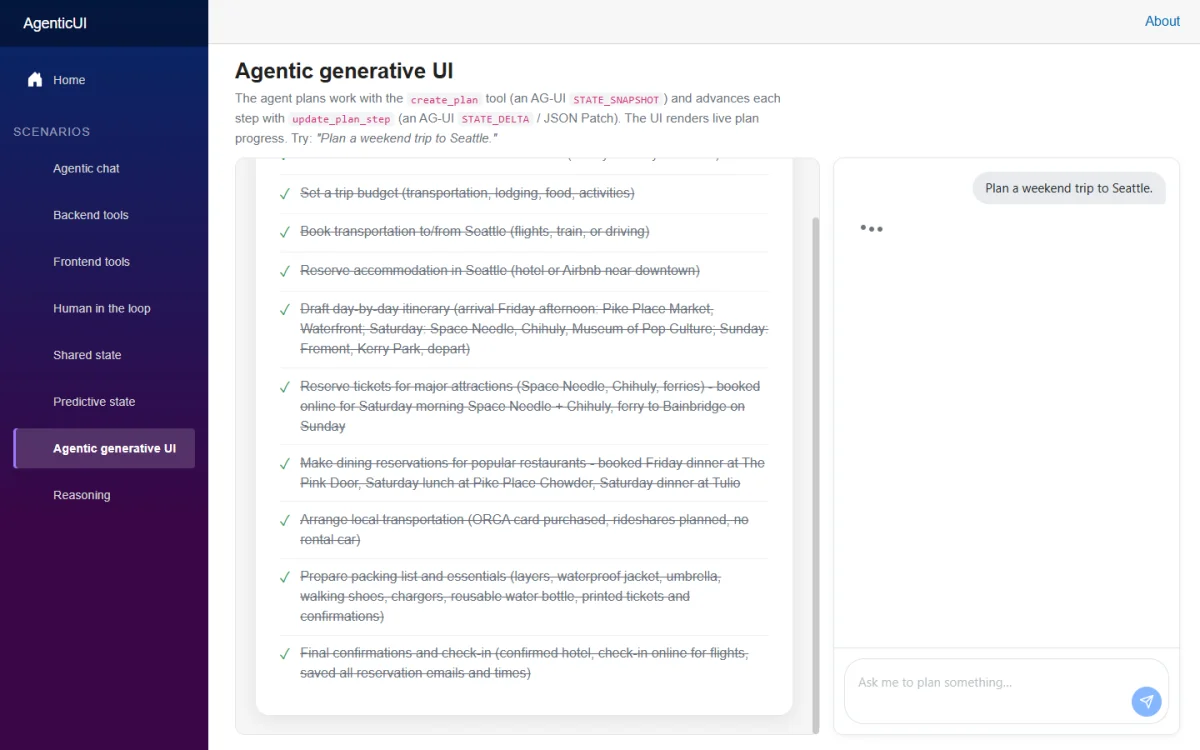
The same state mechanism can drive a live interface. In the agentic generative UI example, the agent creates a plan and updates individual steps. The endpoint maps create_plan to a STATE_SNAPSHOT and update_plan_step to a STATE_DELTA containing an RFC 6902 JSON Patch. The client applies snapshots and deltas to typed PlanState, while Razor renders its steps as a checklist and refreshes as updates arrive.
The application defines the checklist’s appearance and behavior; the agent supplies evolving state. That division also describes the weather card pattern, where a tool result drives a component. The key design choice is to make useful agent output visible in the form that fits the task.
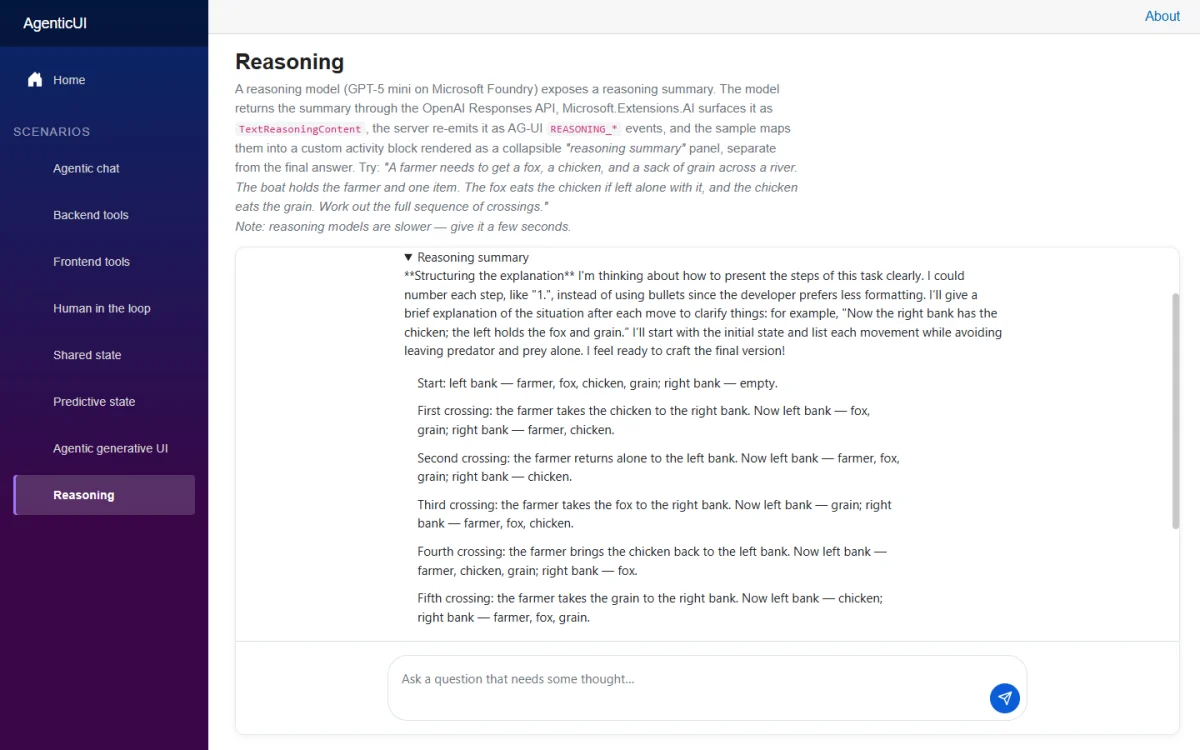
Applications can also turn streamed activity into mutable blocks through ContentBlockHandler<TState>. Its ActivityHandler<TBlock> specialization supports activity snapshots and updates whose payload and completion rules are set by the application. The sample’s reasoning page uses this pattern for TextReasoningContent: a model-provided reasoning summary arrives through the OpenAI Responses API, MAF emits AG-UI REASONING_* events, and a handler accumulates the text into one block.
The summary appears in a collapsible panel apart from the answer. It is content the model provides as a reasoning summary, not hidden chain-of-thought.
What teams should evaluate
The component model’s main contribution is a consistent path from streamed agent events to application UI: content blocks handle interaction output, typed state supports collaborative work, and Razor renderers give developers control over presentation. AG-UI and IChatClient let that UI work with remote or in-process agents through the same wrapper.
There is still application work to do. Teams choose how to parse rich text, build non-text inputs, map protocol updates into their state types and design the controls around tool calls. The package does not make media capture or model-specific processing automatic. And because the components are experimental, their APIs and supported patterns may change as developers try them in real applications.
For teams already building with .NET, the sample offers concrete patterns to assess: streamed formatting, server and frontend tools, approval interrupts, shared editors, proposed changes, live plans and activity summaries. The useful test is whether those patterns make agent behavior easier to understand and guide in the application’s actual workflow. Feedback on missing scenarios and API usability can be shared in the dotnet/aspnetcore repository.
Related resources
- AgenticUI sample
- ASP.NET Core updates in .NET 11 RC1
- AG-UI .NET SDK documentation
- MAF AG-UI overview
The post Build Agentic UI with the new Blazor AI components appeared first on .NET Blog.


